Can I edit the contents of my subscription?

You sure can! We currently offer two versions of our subscription service: an old style and a new style. Depending on which version you’re using, the way to manage your subscription may vary slightly. Don’t worry—we’ll guide you through both.

For the Old Style Subscription:

It looks like you’re on an older version of our subscription system, which is now outdated and doesn’t support direct edits. To make changes, we recommend cancelling your current subscription, and setting up a new one through our updated system. This will give you full flexibility to manage your kit, add or remove products, and easily adjust future deliveries.

To do this, simply log in to My Account, cancel the existing subscription, then head over to your preferred products and create a brand new subscription —it only takes a minute!

For the New Style Subscription:

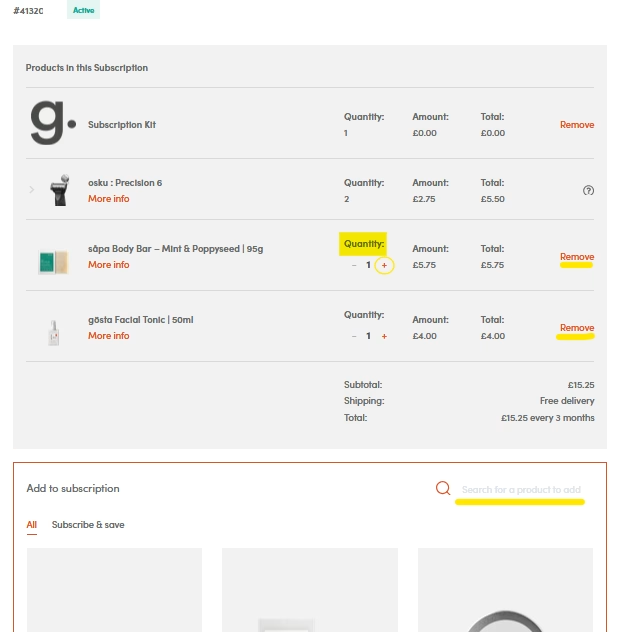
Log into My account whenever you wish, and click on View Details. From there, you can add products using the (+) sign and remove items by selecting the ‘remove’ option. Plus, feel free to search for new products to add using the search bar!

Image 1

Image 2

Still need help? Please follow the link to submit a request through our website or email us at [email protected].